Portal
Publish to SharePoint
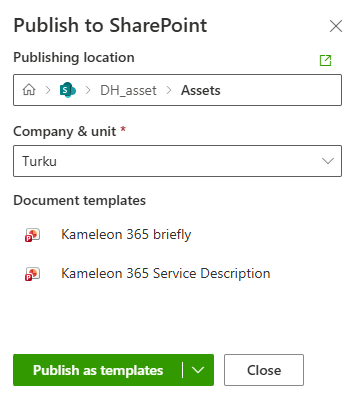
Administrators can now batch generate documents directly within the Kameleon Portal and automatically save them to SharePoint location, e.g. asset library.

Within the Publish to SharePoint panel, users can now select the target SharePoint location alongside the designated company and organizational unit. Additionally, documents can be saved either as standard Office files (.docx, .xlsx, .pptx) or as reusable templates (.dotx, .xltx, .potx) to support varied publishing requirements.
Streamlined action menus
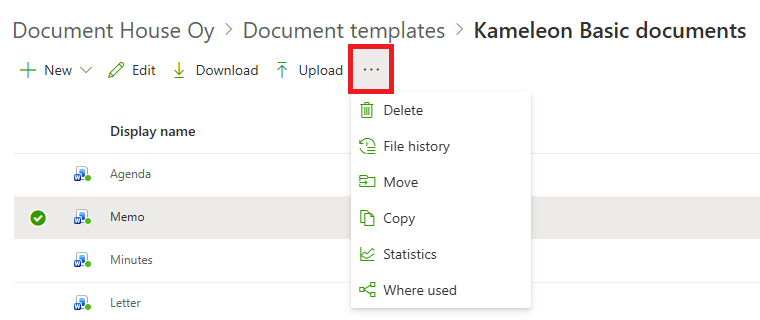
Kameleon Portal toolbar buttons are now context-sensitive, displaying dynamically based on the selected item to ensure only relevant actions are visible. Additionally, secondary actions have been consolidated into a single three-dot options menu to reduce visual clutter and optimize the user experience.
Other
-
Company visibility: Company visibility can now be managed and restricted based on specific user groups
-
Email template predefined attachments: The email template configuration now supports predefined attachments, enabling administrators to automatically include specific files whenever a template is utilized.
Office add-in
Visma sign
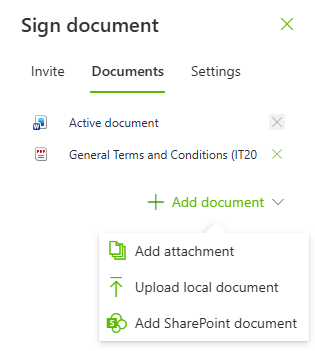
Users can now add multiple documents to the digital signature process simultaneously, with support for uploading files directly from Kameleon Attachments, a local computer or SharePoint.
Outlook add-in
Data tables
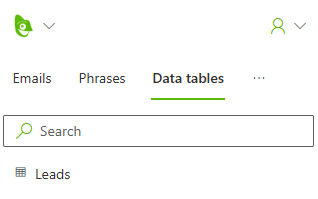
Users can now populate email messages with data tables retrieved from external data sources, enabling the seamless integration of external data directly into the message body. Any required styling or formatting can then be applied using standard Outlook tools.